EMT Practice Test

1. Question Content...


Question List

Question1: You're experiencing odd behavior with a Custom App on your iPad.
How should you gather information about the app issue?

Question2: Which iPadOS feature should you configure to hide your personal email in the Mail app while you're at work?

Question3: You use Apple Watch 6 to track your physical activity and health metrics, but you have some trouble seeing the screen and using the watch controls.
Which iPhone feature can you use to help you see and operate Apple Watch more easily?

Question4: Which screen indicates that iPhone is in recovery mode and ready to be updated or restored?

Question5: Match the macOS library resources listed on the left to the descriptions on the right by dragging responses to the correct target areas. Responses may be used once, more than once, or not at all.

Question6: What are two features of two-factor authentication for a personal Apple ID?

Question7: Select the setting in the sidebar that you should use to automatically keep your Mac up to date.

Question8: Scenario
Melody's Mac has multiple printers configured.
Where in System Settings should you go to determine if her printers were configured manually or by an MDM solution?

Question9: Which two types of Activation Lock are available to organizations?

Question10: What allows a Mac with Apple silicon to use apps and other software like plug-ins, add-ons, and extensions that were written for Intel-based Mac computers in macOS?

Question11: Scenario
You're migrating your Windows PC to a new Mac.
Which software should you download on your Windows PC to aid the migration process?

Question12: Select the setting in the sidebar that you should you use to copy the password of a known Wi-Fi network.

Question13: Which folders normally appear at the root level of the storage volume in the Finder on a Mac?

Question14: Which feature allows you to share your screen during a FaceTime Call?

Question15: How should you check the progress of an installation and error entries when troubleshooting an application installation issue on a Mac?

Question16: Select three responses.
Which three scenarios cause Apple File System (APFS) volumes to generate encryption keys?

Question17: Use this image to answer the question.

What should you do if you forgot your passcode and your iPhone is disabled?

Question18: How should you schedule an email to send in Mail on iPhone?

Question19: You're ready to transfer a sysdiagnose from your iPad to your Mac.
Where in System Settings can you locate the log file on iPad?

Question20: You are using Apple Configurator for Mac to restore an iPad backup and notice that the restore process is taking longer than you expect. Which menu option should you choose to see current activity in Apple Configurator?

Question21: Select the setting in the sidebar that you should use to turn on FileVault.
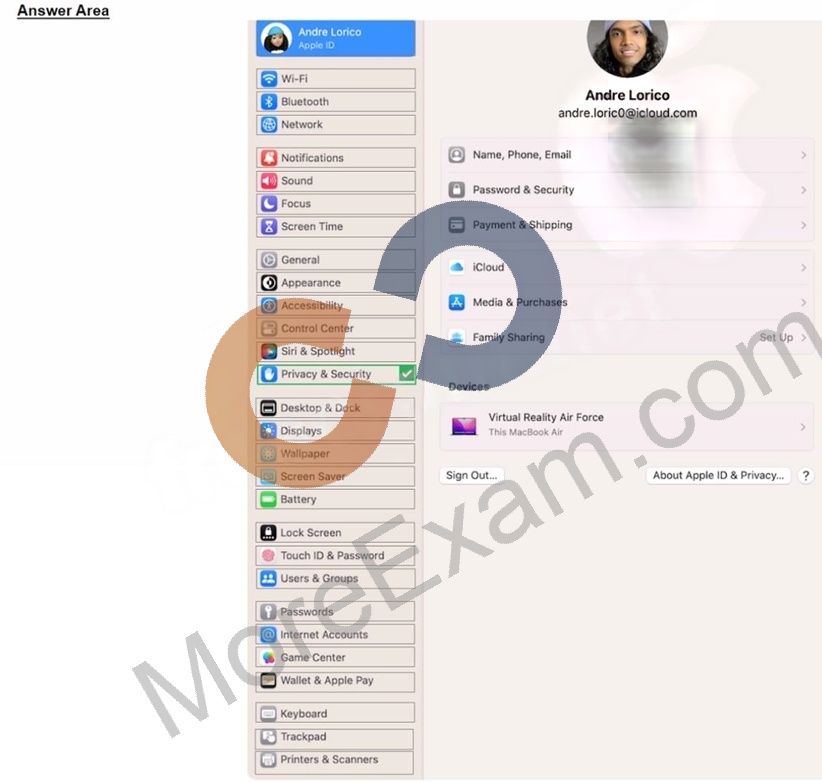
Question22: Use this image to answer the question.

Why is the screen sharing service disabled with the message "This service is currently unavailable"?

Question23: Select the setting in the sidebar that you should use to turn on Lockdown Mode.

Question24: Which troubleshooting steps should you follow if Quick Start does NOT automatically discover the other device?

Question25: Which Wi-Fi authentication settings does Apple recommend for better security for Wi-Fi routers and access points?

Question26: Which service should you use to grant access to your Apple account to others after your death?

Question27: Which Find My feature is available ONLY on MacBook models with Apple silicon?

Question28: Which three peripherals can you share between iPad and Mac when using Universal Control?

Question29: Scenario
Antonio recently bought his iPhone 14 Pro Max. It's taking over an hour to charge the device to 50% using his 5W USB power adapter that came with his previous iPhone.
Why can't Antonio fast charge his iPhone?

Question30: Scenario
Nisha's iPad doesn't charge. She's using the original Apple power adapter and cable that came with her iPad.
Select three responses.
Which three troubleshooting steps should you try to resolve this issue?

Question31: How do you start up into fallback recoveryOS on a Mac with Apple silicon?

Question32: Where should you go in macOS to limit AirPlay Receiver ONLY to devices signed in to your Apple ID?

Question33: How many incorrect password attempts does a Managed Apple ID allow before you're locked out of the account?

Question34: How many days do you have to recover deleted files from iCIoud Drive?

Question35: What should you do in the app's Get Info window if your Mac with Apple silicon doesn't recognize a needed app plug-in when you open the app?

Question36: Scenario
You're troubleshooting a third-party app that frequently quits on your Mac. You've determined that the issue occurs across all user accounts.
What should be your next step in troubleshooting the app's issue?

Question37: Scenario
You would like to access files stored in iCIoud Drive on your Windows PC at work.
What should you do to access these files on your PC?

Question38: What should you do if an app on your iPhone stops responding?

Question39: Select two responses.
Which two ways can you use to reset a FileVault password on a Mac?

Question40: Select three responses.
Which three steps should you take if your iPad stops responding to your keyboard or trackpad that's connected with the Smart Connector?

Question41: How should you force your Mac to reinitialize a peripheral device's connection and reload any peripheral-specific drivers?

Question42: Which macOS and iPadOS feature lets you use your iPad to extend or mirror the display on your Mac?

Question43: Scenario
You're using Migration Assistant to transfer your account named "Andre" from your current MacBook Pro to your new iMac. The iMac is already configured with an account also named "Andre." What happens with Migration Assistant if the account names are the same on both Mac computers?

Question44: How many times does Face ID attempt a face match before requiring you to enter a passcode?

Question45: How do you view log messages grouped by activity in Console on a Mac?